Making Claude Code do VRChat Avatar Work
2026-03-10
Author’s note: I’ve experimented with both OpenAI’s Codex and Claude Code. When I say “Claude” or “agent”, I mean in general an LLM with Tool Use capability. That means what I wrote here applies to Claude, Codex and all the other coding agents.
Claude, setup up the PhysBones on my avatar for my puffed jacket, use the prefab in the project that has them already setup. make no mistakes.
Meanwhile I’m grabbing food, sitdown in front of my desk… and voila, my jacket has PhysBones now.
Over the last few days I’ve been experimenting using Claude Code with Unity to take over avatar work. This is potentially the most powerful tool that is able to automate all kinds of Unity tasks.
Since the emergence of LLMs, we’ve seen a new wave of Unity tools being released every week. Installing a tool to rename animation property names… one to search for animations where a specific property is being animated…
Oh no, now Creator Componanion is full of all kinds of packages from all the listings I’ve added, that I can’t even find VRCFury anymore.
“Why have so many tool for specific tasks, when we can have one tool, that can do them all?” I asked myself.
setup this new fbx as a complete avatar. use my other avatars in the project as reference for avi logic and materials
which toggle is changing _Decal3Alpha?
setup VRCFury toggles for all outfit meshes
organize my expression menu
Not only can an LLM take over tasks that traditional tools were solving. Through their knowledge they understand semantic similarties, that allows them to take on tasks, like organizing an expression menu. They know shorts and jeans should be in the same submenu, something that wouldn’t be achievable with C# code (without resorting to embedding models or making calls to an LLM).
The Setup
By default, Claude will try to manually edit the YAML formatted Unity files. Though scene files can become really big! My scene file with multiple avatar, is 8MB big. This instantly bloats the context. Another issue is that Unity doesn’t expose the data of an parsed FBX file, making Claude unable to understand the scene hierarchy and all its properties of an FBX.
MCP for the rescue!
MCP allows exposing tools for Claude to call upon. My idea was simple. Expose a tool that can run arbitary Unity C# code. Claude generates code on the fly to understand the avatar and make changes to it. For its simplicity of the interface, it’s powerful, but token inefficient. Good enough for the first experiments.
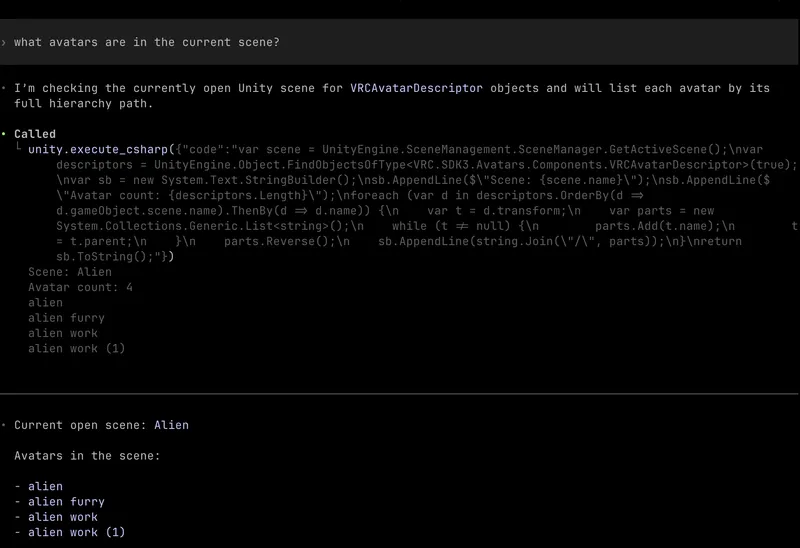
Over time during my experiments, I’ve added guidelines for Claude in the CLAUDE.md file. When I’ve encountered the agent moving into a direction that is wrong, or keep making the same mistakes, I’ve added guidelines to steer Claude towards not doing it again. The risk occurring here is that the CLAUDE.md can become big and filling the context up or the guidelines leading to worse results, because I didn’t think of a task, where a specifc rule in the CLAUDE.md is making Claude regress in that task.
Instead of specificing a bunch of rules, because of the agentic loop it is more effective (tokenwise) to steer Claude into figuring out mistakes and “rules” by itself, which I describe below.
Closing the Agentic Loop
Even with agents hallucinating and making mistakes, as long we can verify its output and feed it back, the agent can self correct.
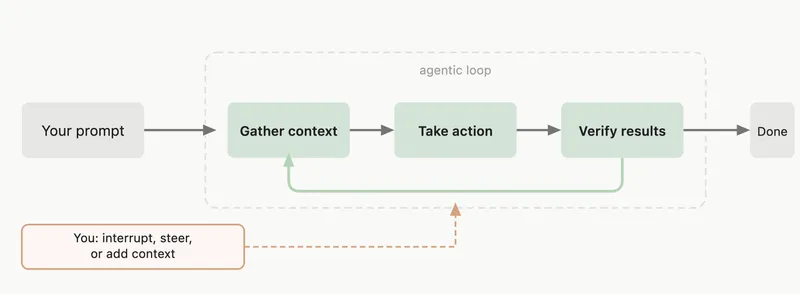
The first loop is the C# execution tool on the MCP. For the on the fly generated C# code, compile and runtime errors are returned to the agent, so that it can fix the mistakes with the error messages as feedback.
The second loop, which is harder to “close”, is verifying the changes to the Animator, meaning avatar logic. I vibecoded a menu toggle diff checker. The agent calls it with the parameter of the toggle and the diff checker responds with a diff on the scene graph, like game object active state, component properties, material properties. The agent ingests the diff output and judges based on that, if the toggle is working as expected.
Another helper tool is a parameter checker. It verifies that parameters in an animator are controlled by a source, like the expression menu, PhysBones, etc. An issue arrised when Claude was working on an FX layer controller that was used inside VRCFury Full Controller. The Full Controller was expecting a parameter driven by a PhysBone. The PhysBone was outside the Full Controller’s GameObject hierarchy. VRCFury rewrote the parameter inside the FX layer, making the PhysBone unable to drive it. The parameter checker is supposed catch “dangling” parameters and the agent should be able to figure out to mark that PB parameter as Global Parameter, leading to VRCFury not rewriting the parameter anymore.
There is still many gaps, like verifying animations on transforms.
Visual correctness could be verified by automaticlly piping a screenshot (or series of screenshots) into the agent. I have not experimented with this yet. I wonder if an agent is capable of deciding which changes are required to change the visual appearance of an animation or material, based on looking at a screenshot. That’s something to investigate in the future.
The Experiments
Here are some of the experiments I did.
The first prompt went something like this:
make toggles for all the skinned meshes on the avatar other than the body, head and hair
In plan mode, Claude asks me if I want VRCFury or native VRChat toggles (with generated animations) and how I want them categorized. It goes on creating VRCFury toggles with appropiate prefixes to sort them into submenus, like I wanted.
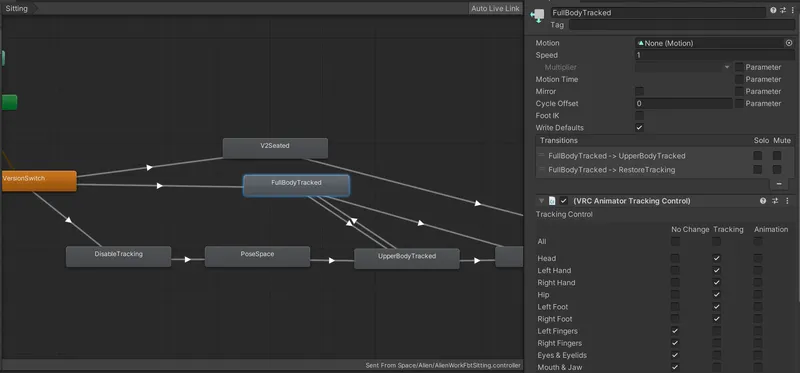
claude there’s this fishing game in vrc where if i sit on the seat of a boat, it forces my avatar in a sitting pose, even tho i’m in fullbody vr. fix that
Claude’s reaction was duplicating VRChat’s default sitting controller and adding an additional state handling FBT. I log in, spawn my boat, sit down on the drivers seat and there you go! No awkward sitting pose.
setup avatar_b.fbx and use avatar_a as reference
It setups the Avatar Descriptor, copies the PhysBones, creates the toggles, etc.
I had to prompt in the same conversation to assign the materials to the same materials of avatar_b where applicable. I could’ve saved one prompt by adding that instruction to the first prompt.
During this experiment, it messed up internal properties of the Avatar Descriptor and the Unity console printed errors. I prompted Claude to read the console and fix the issues. And it did! Following that, I’ve added an instruction to read the console after every avatar change to the CLAUDE.md file. This is the process I generally follow. If I observe incorrect, unwanted, or prefer a specific behavior, I add an instruction to steer Claude towards it.
Even though, Pumkin Tools is available for this use case, this example shows Claude’s generalized problem solving capability. As mentioned above, just with one tool (Claude) its able to solve problems, where I’d usually need to have a collection of tools for each specific problem. I think in this case, with the agents understanding of semantics, it takes on this problem even better.
Observations
A prompt can take several minutes to finish, where me doing the same task manually could be quicker. While Claude is doing its thing, I’m able to do focus on other creative tasks. While it’s running in the background, I can work in Blender or experiment with materials. Claude makes working in Unity not feel like work. I prefer Claude taking longer to finish a task, than me working in the Animator, which I personally dislike.
Expressing to Claude what I want it to get done requires knowing the Unity “language”. It makes mistakes and sometimes I have to steer it into the right direction. But that requires knowledge of the main components of Unity for avatar creation.
What it means for VRChat
With Unity soon releasing their AI Gateway, for me it seems likely that the chat box is what users will interface most of the time. I think it make sense that VRChat SDK 4.0 should make that workflow, using an agent for avatar creation, as easy as possible for their creators. Equally for world creation. We have yet to see how Unity’s MCP server will look like and what tools it will expose to agents. It appears, Unity’s MCP server will support extensions, an official VRChat MCP extension would be great.
The Future
Like mentioned above, letting Claude run without extra instructions in the CLAUDE.md, it will try to work on the YAML formatted Unity files directly.
Imagine this. A token efficient DSL (Design Specific Language), that could be a derivation of GLTF, allowing Claude to explore and edit a scene graph. The same way it works on a code base.
No arbitary IDs, but instead references through file paths.
No prefabs, no managing property modification, but instead just Git - allowing reverting back to the original properties of an object.
No Animator state graph, instead code, that is testable and executable as a unit.
The design will be optimized for what Claude is already good at and resemble a traditional code base. Let’s call that Avatar Format.
A compiler runs the Avatar Format, converting it into GLTF a Unity Asset bundle and do type checking, module/file resolution etc. Or it can be directly imported into a game engine that supports Avatar Format.
Avatar Format doesn’t need to express the complexity of a whole game, instead just 3D avatars.
We will probably see future applications (not just virtual avatars or 3D social games) using file (system) formats that are caterad for agents.
Or MCP servers are all what’s needed.
Hooking it up yourself
I published a repo on GitHub with the helper tools and CLAUDE.md that emerged during my experiments. Install instructions are in the repo.
Friends that tried it out had positive reactions so far. It was fun seeing them getting impressed of the work Claude was able to do for them.
With time I hope to improve the tools and polish the CLAUDE.md.